
Message placement
Where the pre-order message appears relative to your theme’s Add to cart button.- In Shopify admin, open Apps → Bloom.
- Go to Pre-order → Design.
- Under Product page, open Message.
- Pick a Position.
- Click Save.
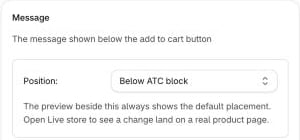
- Default
- Above ATC block
- Below ATC block
- Inside ATC block: Before button
- Inside ATC block: After button
- Inside ATC block: After all buttons
- Inside button: Before text
- Inside button: After text
If Bloom can’t find your buy button, set a custom selector under Apps → Bloom → Settings → Advanced. See Add to cart identification.
Cart placement
Under Pre-order → Settings → Layout & positioning → Cart:- Drawer - where the cart notice sits in the cart drawer.
- Page - where the cart notice sits on the cart page.
- Line item - where the pre-order message sits on each cart line, or Hidden.
Checkout
Under Pre-order → Settings → Cart & checkout → Purchase option.- Enable purchase option at checkout - on by default. Pre-order lines carry Shopify’s pre-order purchase option (selling plan), so checkout shows the native Pre-order name. Shopify blocks gift cards and store credit on any checkout carrying a purchase option - even a pre-order paid in full. Turn this off to sell pre-orders as back orders instead, so customers can pay with gift cards and store credit.
Turning it off changes little for you. Orders lose Shopify’s native Pre-order plan name at checkout, but Bloom’s cart labels, order tagging, fulfilment holds, order notes and emails all keep working. Existing cart lines drop the plan on the next cart sync. Shopify can no longer split orders - see Splitting orders.
Markets
Under Pre-order → Settings → Auto-release orders.- Share inventory across markets - off by default. Treats every market as one pre-order pool with a single oversell limit. Leave off to give each market its own stock and limit. See Pre-order by market.
Advanced
Optional content under Apps → Bloom → Pre-order → Content. Defaults work for most stores.- Cart line label (under Cart messages) - the prefix shown before every pre-order message on the product page and on each cart line. Default
Ships, so messages read e.g. “Ships: late July”. - Purchase option name (under Button text) - the label shown under each pre-order line in Shopify checkout. Default
Pre-order.