
Plans
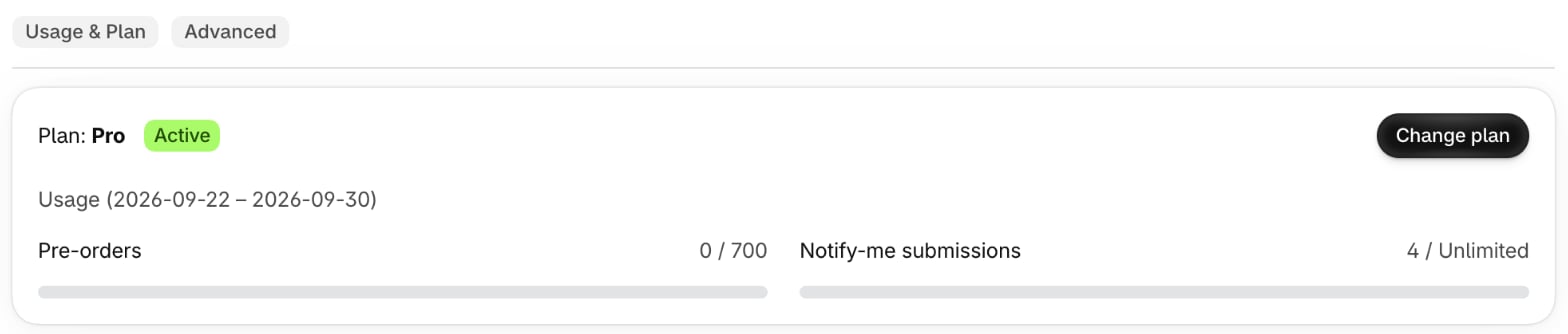
Prices in USD, billed monthly. Each plan caps pre-orders and Notify Me sign-ups per billing period.
Hibernate keeps your settings, styles and analytics while pre-order and Notify Me are quiet. Enterprise is for stores above 2,500 pre-orders a month - email support@goodnative.co for a quote.
Every other feature is on every plan.
What counts
- Pre-orders. An order counts once when it has at least one pre-order line and a subtotal above 0 exchanges and replacements never count.
- Notify Me sign-ups. Every form submission counts, including campaign sign-ups.
- Billing period. Usage resets at the start of each Shopify billing period.
Caps apply during your free trial.
Over your cap
Caps are hard. Once usage goes over either cap, Bloom pauses on your storefront until you upgrade. Bloom never bills overage.- Pre-order variants fall back to your sold-out label.
- Notify Me form is hidden on sold-out variants.
- Recommendations stop showing.
- Existing Notify Me sign-ups still receive their emails when stock returns - they live in Klaviyo.
- Existing pre-orders are unaffected - checkout banner and order status page still work.
Subscription cancelled or expired
Everything above, plus:- Checkout pre-order banner stops showing.
- Order status pre-order block stops showing.
- Ship-date updates stop appending to the order note.