
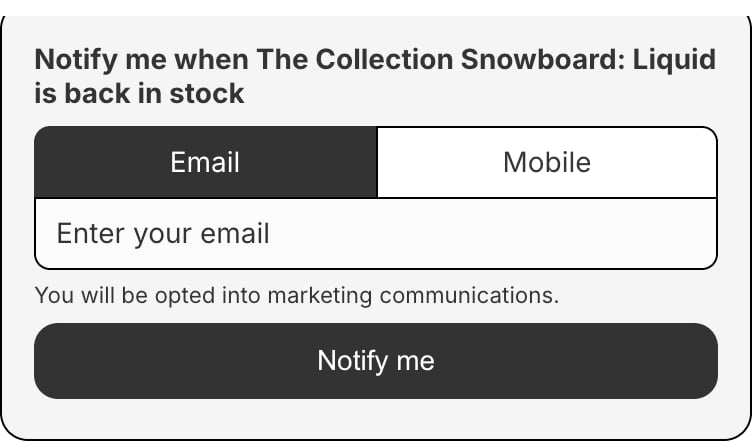
How it works
- When a variant is out of stock, Bloom adds a Notify Me form below add to cart. Shoppers enter email or phone and submit. On pre-order variants the form sits behind a Notify me when available button - see how the form displays.
- Sign-ups go to Klaviyo as a back-in-stock subscription. The customer’s profile and the subscribed variant are recorded.
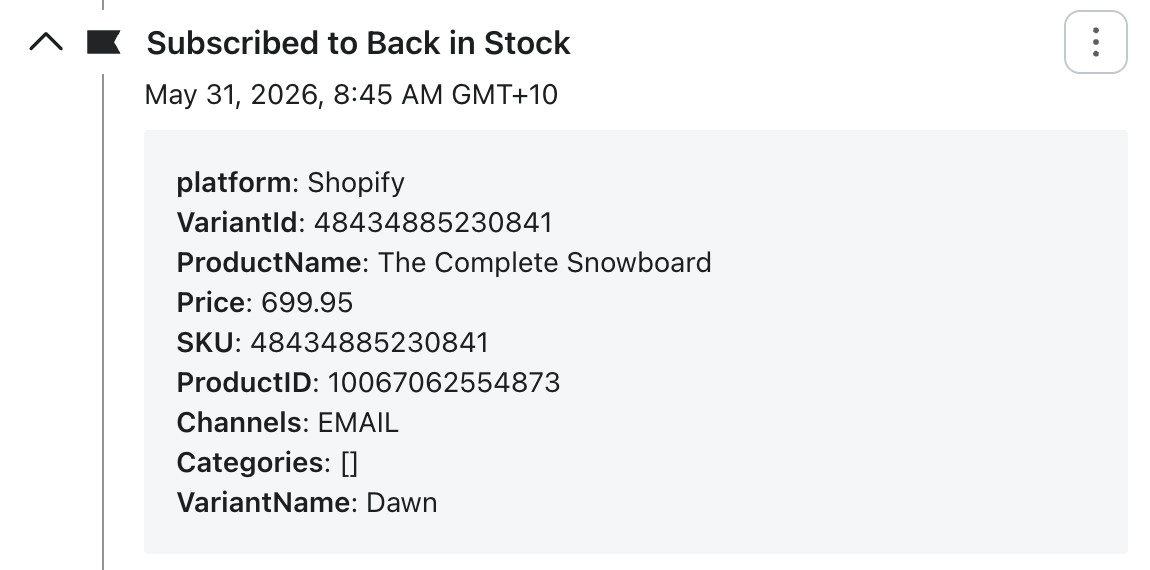
- Sign-ups also sync to Shopify as customers. Bloom finds or creates the Shopify customer, and when the shopper opts in to marketing, records their email or SMS marketing consent on the customer record.
- The form personalises itself. The button label, form heading, submit button, and success message accept
{product-name}and{variant-name}tokens, substituted for the selected variant on the storefront - e.g. Notify me when Classic tee Small / Black is back in stock. Single-variant products substitute an empty variant name. Set these in Apps → Bloom → Notify me → Content. - Klaviyo sends the notifications to customers. When inventory becomes back in stock a flow will send emails & text messages. You build the email and SMS flow in Klaviyo - full control over branding, copy, send frequency, and channel.
- Orders are tagged. When a shopper orders the product they were notified about, Bloom tags the order
Notify Meand sends order events to Klaviyo - see Notify Me orders. - Works per variant. Medium variant can receive Notify Me sign-ups, while Large variant is in stock or notify me is disabled.
- Plays nicely with pre-order. By default a pre-order variant shows both Pre-order and Notify Me. Turn Notify Me off on the variant to show pre-order only.
- Campaigns ask extra questions. Attach a campaign to a variant to change the form’s copy and ask one question at sign-up - see Notify Me Campaigns.
Syncing sign-ups to Shopify customers uses the
write_customers permission. Stores installed before this was added are prompted to re-authorise Bloom on update.What you need to do
- Follow the Notify Me quick start - theme embed, design, Klaviyo, flow
- Connect Klaviyo - one click, then pick your back-in-stock list
You will start receiving notify me signups at this point
- Set up the back-in-stock flow in Klaviyo - emails, SMS, send frequency
- [Optional] Customise each product - button label, form heading
- [Optional] Disable any products you don’t want offering Notify Me
- [Optional] Add a campaign - custom copy and a question at sign-up
Klaviyo SMS is only available to send to subscribers in supported countries.Australia, Austria, Belgium, Canada, Denmark, Finland, France, Germany, Hungary, Ireland, Italy, Luxembourg, Netherlands, New Zealand, Norway, Poland, Portugal, Spain, Sweden, Switzerland, United Kingdom, United States.
Tracking
Bloom emits events for the Notify Me flow:- Notify Me viewed
- Notify Me form opened
- Notify Me sign-up submitted