
- Customise the button text or form heading for a specific product
- Attach a campaign to a product or variant
- Turn it off for a specific product - see Disable Notify Me on a product
Steps
- In Shopify admin, open Apps → Bloom.
- Go to Notify me → Configure products.
- Search by title or SKU, or filter the list. Notify Me state narrows to Disabled, Customized or Has campaign variants; Product status and Stock level sit beside it, with vendor, tag, product type and collection under More filters.
- Edit the Apply to all row to set every matching variant at once, or edit a single product or variant row.
- Click Save.
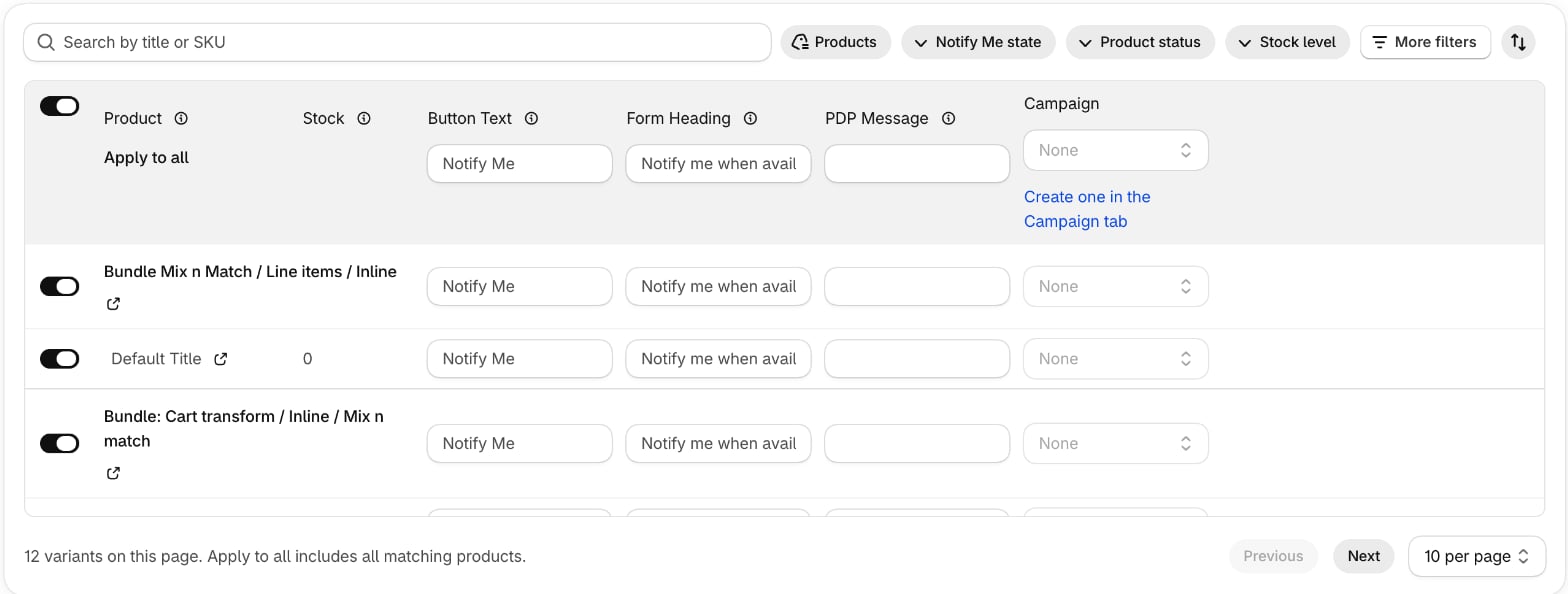
Fields
- Notify me - the toggle in column 1. On by default. Turn it off for variants you don’t want offering Notify Me - see Disable Notify Me on a product.
- Button Text - override the default button label, e.g. “Register your interest” instead of “Notify me”.
- Form Heading - the heading above the email/phone form.
- PDP Message - extra copy shown with the form on the product page.
- Campaign - attach a Notify Me campaign, or None. Disabled until you create one on the Campaign tab.
{product-name} and {variant-name} tokens.
Editing many products? Export, edit and import them in bulk with the Products CSV.
Notify Me has no editor on Shopify’s own product page - the Purchase options card only carries pre-order. Edit Notify Me in Bloom.
Storefront defaults
Message position, contact methods and marketing opt-in are store-wide - set them in Notify Me settings.When Notify Me shows on the storefront
Notify Me appears on a variant when all of these are true:- Bloom is enabled in the theme
- The variant is out of stock in Shopify, or on pre-order
- Notify me is enabled (it is by default)
- Your store is within its plan’s Notify Me sign-up allowance