> ## Documentation Index
> Fetch the complete documentation index at: https://help.goodnative.co/llms.txt
> Use this file to discover all available pages before exploring further.
# Tailor template, market or locale
> Use Shopify's theme editor to override Bloom's colours, messaging and settings per template, locale, or market to create a tailored experience.
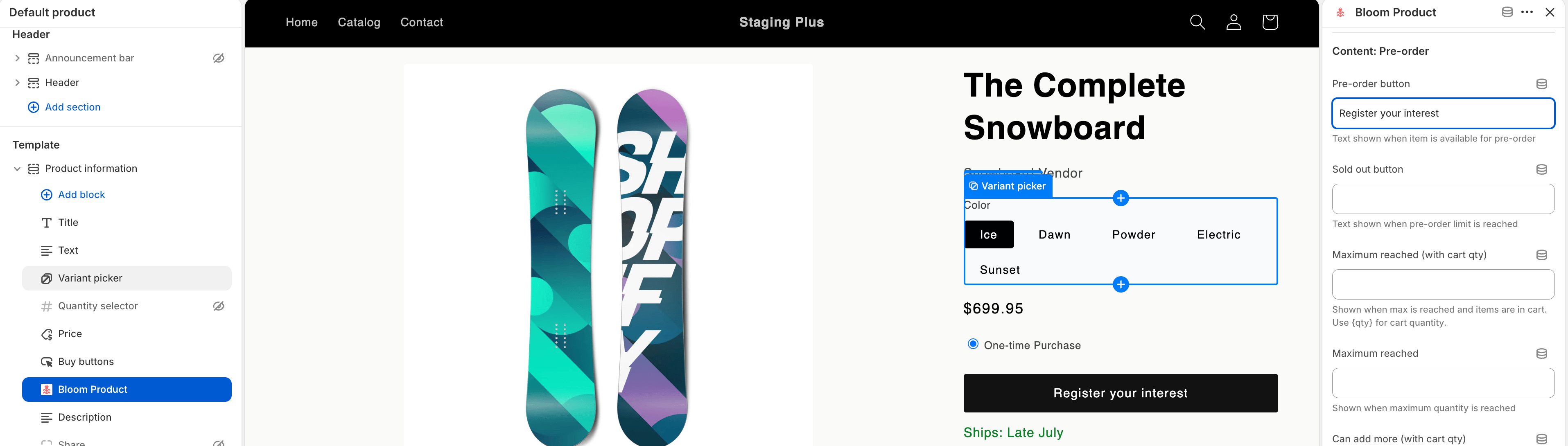
Most Bloom settings live in **Apps → Bloom → Design** and **Content** and apply everywhere. When you need different look or wording in one place, the **Bloom** and **Bloom Product** theme blocks let you override per **template**, **locale**, or **market** from Shopify's theme editor.

 ## What you can override
* **Colours** - button, text, sold-out, hover and focus states.
* **Messaging & content** - e.g. `Reserve now` on a launch page, `Pre-order` everywhere else.
* **Cart messages** - line item and cart summary text.
* **Settings** - various settings can be overridden
Sizes, fonts, spacing, borders, and behaviour stay global - set them from the Bloom admin.
## When you'd use it
**Product template** - run a campaign or launch page with louder colours and different copy, while the rest of the catalogue uses your standard styling.
**Market translation** - the pre-order button and cart message for each language. Shopify serves the right copy automatically based on the shopper's language.
**Run different rules per market:**
* Don't offer pre-order in markets you don't ship to yet - remove the **Bloom Product** block from that market's template.
* Match each market's tone: `Ships late July` in English, the equivalent in French.
* Use market-specific colours where the same product has a different look.
AB Testing - run one template with notify me and pre-order and nother without. (We recommend and tested Shopify Testing app [Shoplift](https://apps.shopify.com/shoplift))
## How to edit
1. From Shopify admin, go to **Online Store → Themes → Customise**
2. Switch to the **template**, **locale**, or **market** you want to override
3. Select the **Bloom (Theme block)** or **Bloom Product** block
4. Edit the fields you want to override.
5. Click **Save**.
Anything you don't override falls back to your global Bloom settings.
## What you can override
* **Colours** - button, text, sold-out, hover and focus states.
* **Messaging & content** - e.g. `Reserve now` on a launch page, `Pre-order` everywhere else.
* **Cart messages** - line item and cart summary text.
* **Settings** - various settings can be overridden
Sizes, fonts, spacing, borders, and behaviour stay global - set them from the Bloom admin.
## When you'd use it
**Product template** - run a campaign or launch page with louder colours and different copy, while the rest of the catalogue uses your standard styling.
**Market translation** - the pre-order button and cart message for each language. Shopify serves the right copy automatically based on the shopper's language.
**Run different rules per market:**
* Don't offer pre-order in markets you don't ship to yet - remove the **Bloom Product** block from that market's template.
* Match each market's tone: `Ships late July` in English, the equivalent in French.
* Use market-specific colours where the same product has a different look.
AB Testing - run one template with notify me and pre-order and nother without. (We recommend and tested Shopify Testing app [Shoplift](https://apps.shopify.com/shoplift))
## How to edit
1. From Shopify admin, go to **Online Store → Themes → Customise**
2. Switch to the **template**, **locale**, or **market** you want to override
3. Select the **Bloom (Theme block)** or **Bloom Product** block
4. Edit the fields you want to override.
5. Click **Save**.
Anything you don't override falls back to your global Bloom settings.