> ## Documentation Index
> Fetch the complete documentation index at: https://help.goodnative.co/llms.txt
> Use this file to discover all available pages before exploring further.
# Notify Me overview
> How Bloom's Notify Me captures out-of-stock sign-ups on Shopify product pages and syncs them to Klaviyo to trigger back-in-stock emails and SMS.
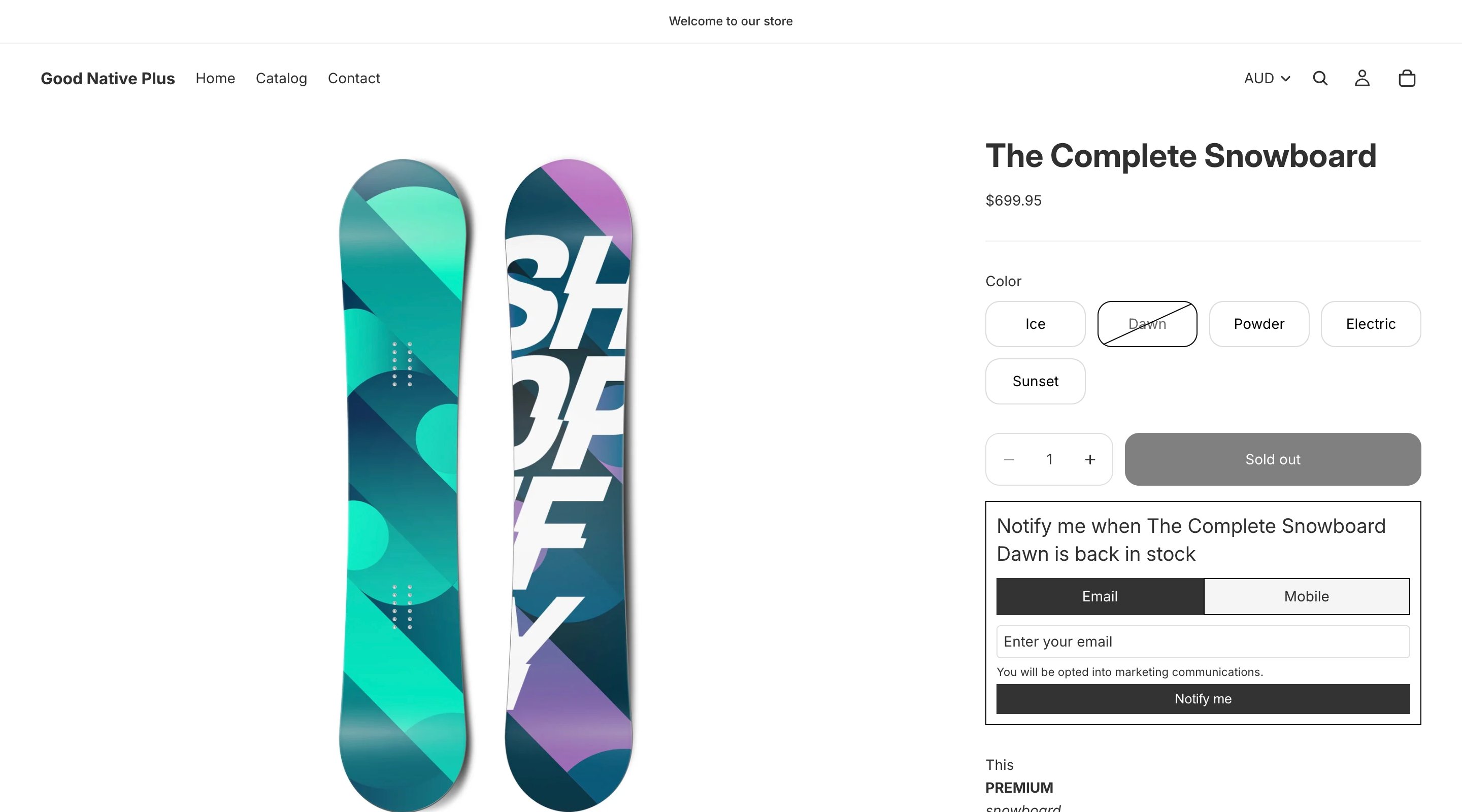
Notify Me captures interest from shoppers when a product is out of stock. Instead of a greyed-out **Sold out** button, the product page shows **Notify me when back in stock**. Sign-ups flow into Klaviyo's native back-in-stock system, where you control the emails and SMS that go out.
 ## How it works
* **When a variant is out of stock**, Bloom adds a Notify Me form below add to cart. Shoppers enter email or phone and submit. (You can change the layout in [Notify Me settings](/bloom/notify-me/settings#display-mode).)
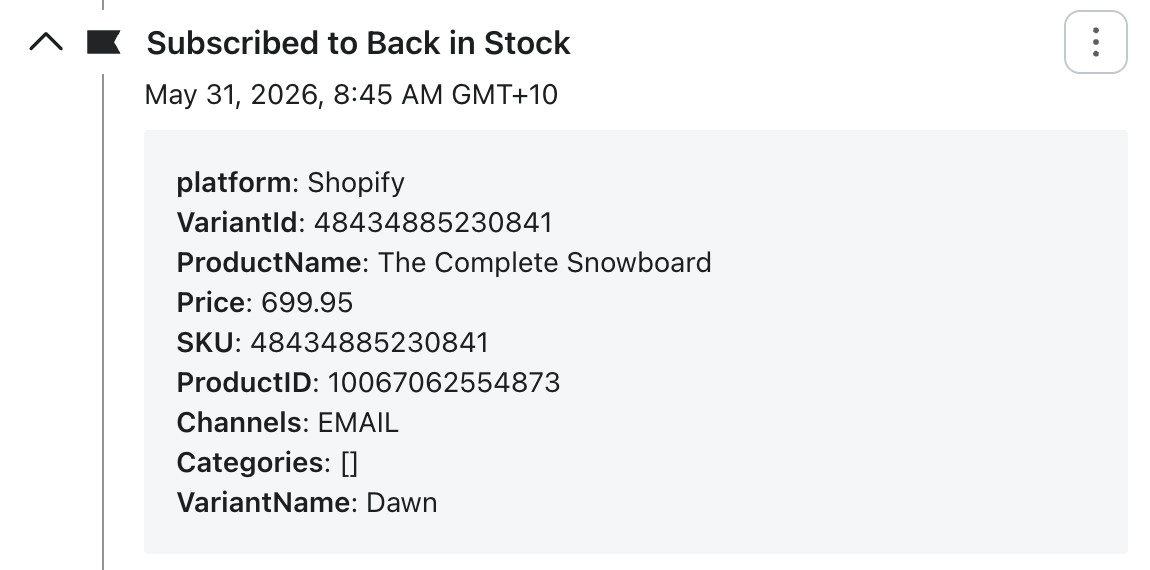
* **Sign-ups go to Klaviyo** as a [back-in-stock subscription](https://help.klaviyo.com/hc/en-us/articles/16025437388699). The customer's profile and the subscribed variant are recorded.
## How it works
* **When a variant is out of stock**, Bloom adds a Notify Me form below add to cart. Shoppers enter email or phone and submit. (You can change the layout in [Notify Me settings](/bloom/notify-me/settings#display-mode).)
* **Sign-ups go to Klaviyo** as a [back-in-stock subscription](https://help.klaviyo.com/hc/en-us/articles/16025437388699). The customer's profile and the subscribed variant are recorded.

 * **Sign-ups also sync to Shopify as customers.** Bloom finds or creates the Shopify customer, and when the shopper opts in to marketing, records their email or SMS marketing consent on the customer record.
* **The form personalises itself.** The button label, form heading, submit button, and success message accept `{product-name}` and `{variant-name}` tokens, substituted for the selected variant on the storefront - e.g. *Notify me when Classic tee Small / Black is back in stock*. Single-variant products substitute an empty variant name. Set these in **Apps → Bloom → Content → Notify me**.
* **Klaviyo sends the notifications to customers**. When inventory becomes back in stock a flow will send emails & text messages. [You build the email and SMS flow in Klaviyo](/bloom/notify-me/flow) - full control over branding, copy, send frequency, and channel.
* **Works per variant.** Medium variant can receive notify me singups, while Large variant is in stock or notify me is disabled.
* **Plays nicely with pre-order.** By default a pre-order variant shows both Pre-order and Notify Me. [Hide Notify Me on pre-order variants](/bloom/notify-me/settings#hide-notify-me-if-product-on-pre-order) to show pre-order only.
Syncing sign-ups to Shopify customers uses the `write_customers` permission. Stores installed before this was added are prompted to re-authorise Bloom on update.
## What you need to do
1. [Enable Bloom in your theme](/bloom/quick-start) (one-time setup)
2. [Connect Klaviyo](/bloom/notify-me/connect-klaviyo) - paste your Company ID and List ID into Bloom
You will start receiving notify me signups at this point
3. [Set up the back-in-stock flow](/bloom/notify-me/flow) in Klaviyo - emails, SMS, send frequency
4. \[Optional] [Customise each product](/bloom/notify-me/product-config) - button label, form heading
5. \[Optional] [Disable any products](/bloom/notify-me/disable) you don't want offering Notify Me
Notify Me will not send any notifications until you've completed both **Connect Klaviyo** and the **back-in-stock flow** setup in Klaviyo. Sign-ups are still captured, but customers won't hear anything when stock returns.
Klaviyo SMS is only available to send to subscribers in [supported countries](https://help.klaviyo.com/hc/en-us/articles/7951291970331).
*Australia, Austria, Belgium, Canada, Denmark, Finland, France, Germany, Hungary, Ireland, Italy, Luxembourg, Netherlands, New Zealand, Norway, Poland, Portugal, Spain, Sweden, Switzerland, United Kingdom, United States.*
## Tracking
Bloom emits events for the Notify Me flow:
* Notify Me viewed
* Notify Me form opened
* Notify Me sign-up submitted
These can be pushed to GA4, GTM, Klaviyo, Meta Ads, and Google Ads. See [Notify Me tracking](/bloom/notify-me/tracking) for the full event list and how to configure destinations.
* **Sign-ups also sync to Shopify as customers.** Bloom finds or creates the Shopify customer, and when the shopper opts in to marketing, records their email or SMS marketing consent on the customer record.
* **The form personalises itself.** The button label, form heading, submit button, and success message accept `{product-name}` and `{variant-name}` tokens, substituted for the selected variant on the storefront - e.g. *Notify me when Classic tee Small / Black is back in stock*. Single-variant products substitute an empty variant name. Set these in **Apps → Bloom → Content → Notify me**.
* **Klaviyo sends the notifications to customers**. When inventory becomes back in stock a flow will send emails & text messages. [You build the email and SMS flow in Klaviyo](/bloom/notify-me/flow) - full control over branding, copy, send frequency, and channel.
* **Works per variant.** Medium variant can receive notify me singups, while Large variant is in stock or notify me is disabled.
* **Plays nicely with pre-order.** By default a pre-order variant shows both Pre-order and Notify Me. [Hide Notify Me on pre-order variants](/bloom/notify-me/settings#hide-notify-me-if-product-on-pre-order) to show pre-order only.
Syncing sign-ups to Shopify customers uses the `write_customers` permission. Stores installed before this was added are prompted to re-authorise Bloom on update.
## What you need to do
1. [Enable Bloom in your theme](/bloom/quick-start) (one-time setup)
2. [Connect Klaviyo](/bloom/notify-me/connect-klaviyo) - paste your Company ID and List ID into Bloom
You will start receiving notify me signups at this point
3. [Set up the back-in-stock flow](/bloom/notify-me/flow) in Klaviyo - emails, SMS, send frequency
4. \[Optional] [Customise each product](/bloom/notify-me/product-config) - button label, form heading
5. \[Optional] [Disable any products](/bloom/notify-me/disable) you don't want offering Notify Me
Notify Me will not send any notifications until you've completed both **Connect Klaviyo** and the **back-in-stock flow** setup in Klaviyo. Sign-ups are still captured, but customers won't hear anything when stock returns.
Klaviyo SMS is only available to send to subscribers in [supported countries](https://help.klaviyo.com/hc/en-us/articles/7951291970331).
*Australia, Austria, Belgium, Canada, Denmark, Finland, France, Germany, Hungary, Ireland, Italy, Luxembourg, Netherlands, New Zealand, Norway, Poland, Portugal, Spain, Sweden, Switzerland, United Kingdom, United States.*
## Tracking
Bloom emits events for the Notify Me flow:
* Notify Me viewed
* Notify Me form opened
* Notify Me sign-up submitted
These can be pushed to GA4, GTM, Klaviyo, Meta Ads, and Google Ads. See [Notify Me tracking](/bloom/notify-me/tracking) for the full event list and how to configure destinations.